Your golf swing has a number.
Your watch measures it.
Tempo and Crest from your Apple Watch, drawn over video of every swing on your iPhone.
/loops/mode-crest.mp4
Understand the numbers
Backswing, downswing, tempo and Crest.
The thin outer arc. Takeaway to the top, in seconds.
The thick band. Top to the ball, colored by your acceleration.
Backswing ÷ downswing. Tour players sit near 3 to 1.
Where your hands gain speed fastest. 0 is the top, 1 is the ball.
Crest 0.86
A normal swing. Speed peaks near the ball.
Crest 0.60
The same golfer casting. Speed peaks barely past halfway.
Understand the pictures
Crest, Axis and Tilt, controlled from your wrist.
/loops/mode-crest.mp4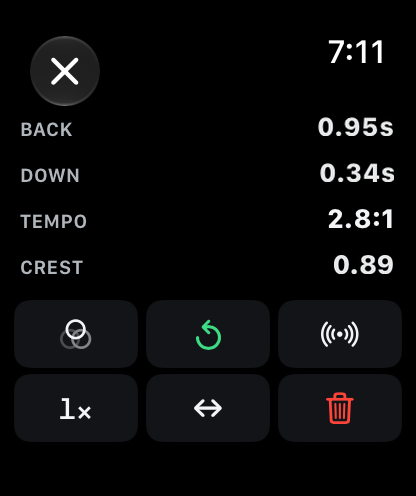
Your hand path, lit by your speed
The trail is colored by your acceleration and the ring marks your Crest. All controlled from the remote on your wrist.
/loops/mode-axis.mp4Rotation or sway
Good rotation stays inside the tube. Sway drifts out of it.
/loops/mode-tilt.mp4Address against impact
Shoulder, hip and spine lines. Dashed is address, solid moves with you.
Understand the data
Your spread by club, and your trend over weeks.
WHY THE ± MATTERS
Watch the spread tighten
Tornu keeps a running spread for every club and colors it against the target you set. Watching it shrink is what practice looks like when it's working.
| Club | n | Tempo | Crest |
|---|---|---|---|
| DR | 12 | 2.9 ±0.12 | 0.82 ±0.03 |
| 7i | 18 | 2.8 ±0.09 | 0.80 ±0.02 |
| 9i | 15 | 2.7 ±0.11 | 0.79 ±0.03 |
| PW | 9 | 2.6 ±0.19 | 0.78 ±0.04 |
An example session. Green means the spread is inside your target; red means it isn't yet.
THE SAME HISTORY, ASKED DIFFERENT QUESTIONS
One club at a time, or all of them
Every saved swing lands in one history. Filter by club, by date, or to rounds only, and watch a month of work take shape.
- By club
- By date range
- Practice or round
- Any of the four numbers
Crest point per session, with the spread beneath each point. Green is inside your target, red is outside.
USING TORNU
Getting started guide
From pairing to your first replay. Tap a step for the details.
01Pair the two apps
Install Tornu on your iPhone and the watch app installs alongside it. Open the watch app once and the two find each other. After that, the watch works on its own with the phone in your bag, and hands its sessions over the next time the two connect.
02Pick a club and start a session
Tap the club label on the watch and choose from your bag, then start a session. A session is one bucket of balls or one round, and starting it on either device starts it on both.
Everything Tornu reports is kept per club, so change club whenever you like. Each saved swing is stamped with the club selected at the time.
03Set up the camera Optional, for video replay
Prop your iPhone up face-on, square to your chest with its camera facing you, 8 to 10 feet away so the whole swing fits, and choose the front or back camera. While the camera is live, the level on the video shows when the phone is straight.
The camera must be face-on: Crest, Axis and Tilt are drawn for that view, not for down the line. The camera is optional: the watch measures every swing either way.
04Swing, then save the ones worth keeping
There's nothing to press. Tornu recognizes the shape of a swing and reads it as it happens. A measured swing taps your wrist and draws its arc, with your tempo and Crest beside it.
Tap Save to keep a swing in the session. Only saved swings count toward your averages and your 50 free swings, so a mis-hit costs you nothing.
05Replay it and switch the overlay
Each saved swing replays on your iPhone. Tap the mode label to move through Crest, Axis, Tilt and Normal. Replay it again, slow it down, mirror it, or go back to the live camera for the next swing.
06Go full screen, and use your watch as the remote
Tap full screen for the biggest view, with TOP and IMPACT jumps and frame-by-frame stepping. From the shot list on your watch, tap ▶ beside any swing to open it on the phone, then control it from your wrist: overlay, replay, live camera, speed, mirror and delete.
07End the session
Tap End & Save and say what it was: Practice, Round, Discard or Keep Going. Tornu builds the per-club table and averages, and the session is readable on both devices from then on.
Apple Watch guide
Clubs, sessions, reading the arc, saving swings, the remote and review on your wrist.
Read the watch guide →iPhone guide
Swing video and overlays, full screen, the trend chart, your bag and backups.
Read the iPhone guide →Questions
Tempo, Crest, indoor practice, swing video, your data and pricing.
Read the questions →LATEST RELEASE
1.1
Swing video, properly: Crest, Axis and Tilt on every swing, full screen, and your watch as the remote.
All release notes- Crest, Axis and Tilt overlays on every swing
- Swing videos saved on your iPhone
- Full screen with TOP, IMPACT and frame stepping
- Your watch as the remote
- A refreshed watch screen
- A simpler Settings, with Tolerance and Clubs on their own screens
PRICING
Try it for fifty swings
Save fifty swings with everything unlocked. No card, no clock, no account.